
Introduction
You've noticed your website isn't performing like it used to. Maybe visitors are leaving faster than they arrive, or perhaps your competitor's sites look more modern and professional. You know something needs to change, but you're stuck on a crucial question: should you refresh what you have or start completely from scratch?
This decision isn't just about aesthetics. It affects your budget, timeline, SEO rankings, and ultimately, your bottom line. Choose the wrong approach, and you could waste thousands of dollars and months of time on a solution that doesn't address your real problems. Pick the right one, and you'll have a website that drives leads, builds trust, and grows with your business.
The terms "website revamp" and "website redesign" often get used interchangeably, but they represent fundamentally different approaches to improving your online presence. A revamp is like renovating your kitchen—you're keeping the bones of the house but updating the look and functionality. A redesign is more like building a new house from the ground up—everything gets reconsidered and rebuilt.
Understanding the website revamp vs redesign distinction matters because each approach serves different business needs. A revamp works when your foundation is solid but needs modernization. A redesign becomes necessary when fundamental problems prevent your site from achieving your business goals.
In this guide, you'll learn exactly what separates these two approaches, how to identify which one your business needs, and what to expect in terms of cost, timeline, and results. We'll walk through clear signs that point you toward one option over the other, helping you make a confident decision that aligns with your business objectives and budget. By the end, you'll have a practical framework for evaluating your website and moving forward with the right solution.
What Is a Website Revamp?
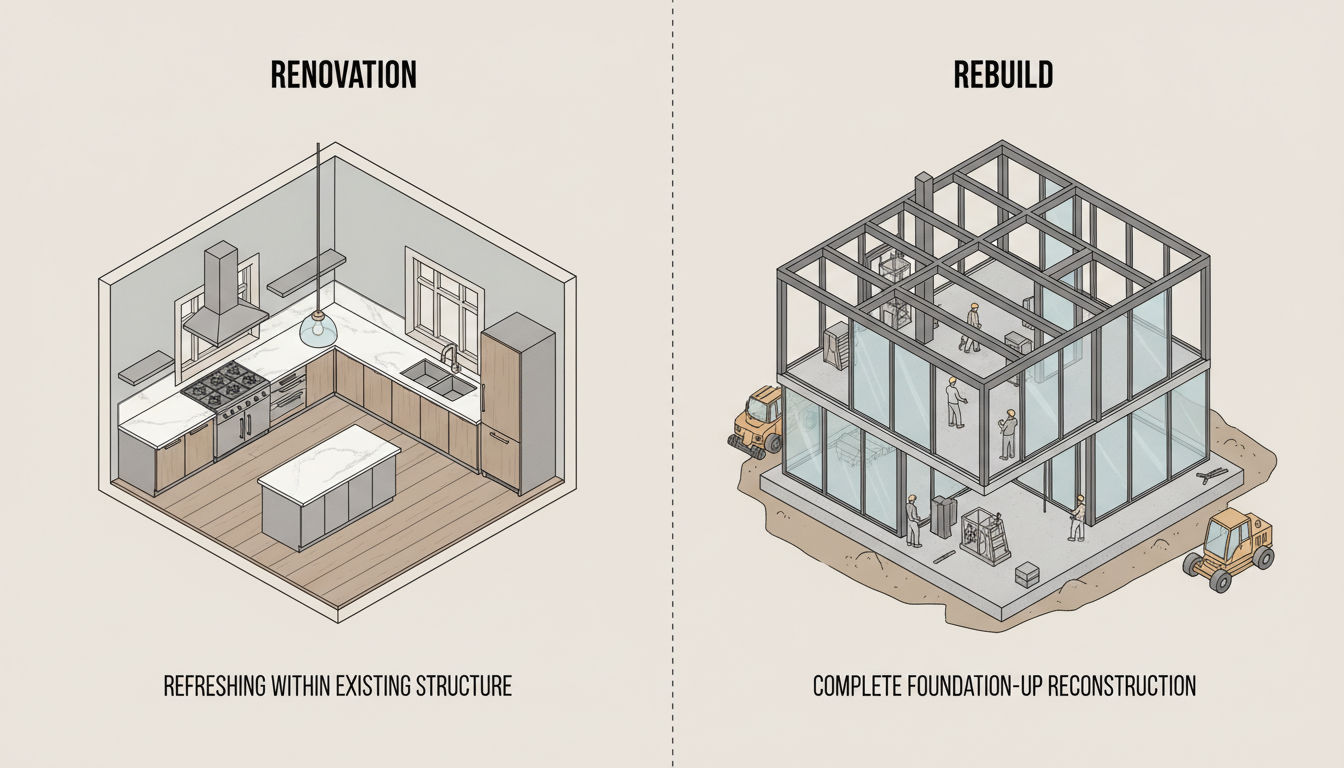
A website revamp, sometimes called a refresh or facelift, involves updating and improving your existing website without changing its fundamental structure or platform. Think of it as giving your site a fresh coat of paint and some new furniture while keeping the same floor plan. You're working with what you have, making targeted improvements that enhance appearance, functionality, and user experience without starting over.
The scope of a revamp typically focuses on surface-level and moderate-depth changes. You might update your color scheme, typography, and imagery to reflect current design trends. You could improve navigation menus, add new features like contact forms or chat widgets, and optimize existing pages for better conversion rates. The key distinction is that you're building upon your current foundation rather than replacing it.
Website revamp projects share several common characteristics. They preserve your existing content management system and technical infrastructure. Your URLs typically stay the same, which protects your SEO equity. The core architecture of your site—how pages connect and how information is organized—remains largely intact. You're enhancing and optimizing rather than rebuilding.
Common elements included in a revamp project include visual updates like new graphics, updated fonts, and refreshed color palettes. You might reorganize content on specific pages to improve clarity and conversions. Adding new sections like testimonials, case studies, or updated service descriptions falls within revamp territory. Technical improvements like faster loading times, better mobile optimization, and updated plugins also count as revamp work.
A revamp makes sense when your website has good bones but needs modernization. If your site was well-built initially and the underlying technology still works effectively, a revamp offers the most cost-effective path forward. This approach works particularly well when your brand identity remains consistent, your business model hasn't dramatically changed, and your main concern is keeping up with current design standards and user expectations.
Businesses often choose revamps when they need to update content regularly, want to improve specific conversion points, or need to address particular user feedback without the disruption of a complete overhaul. If your analytics show that people are finding your site but not engaging as you'd like, targeted revamp improvements can often solve these issues without the time and expense of starting fresh.
The beauty of a revamp lies in its efficiency. You're investing in improvements that matter while preserving the investment you've already made in your current site. For many businesses, especially those with limited budgets or tight timelines, a strategic revamp delivers significant improvements without the disruption and cost of a complete redesign.
What Is a Website Redesign?

A website redesign represents a complete overhaul of your online presence, rebuilding your site from the ground up. Unlike a revamp that works within existing structures, a redesign questions everything: your platform, your information architecture, your content strategy, your visual identity, and your technical foundation. It's not about updating what exists—it's about reimagining what's possible.
The scope of a redesign extends far beyond visual changes. You're typically migrating to a new platform or significantly upgrading your current one. Every page gets reconceived with fresh layouts, new content structures, and updated functionality. Your sitemap gets redrawn, often consolidating, eliminating, or adding pages based on current business needs. The entire user journey through your site gets mapped and optimized from scratch.
Website redesign projects involve fundamental changes to how your site works. You might switch from an outdated custom-built site to a modern content management system, or upgrade from an older platform to newer technology. Your design system gets completely rebuilt with new branding elements, typography, color schemes, and visual styles. The code underlying your site gets rewritten, implementing modern standards and best practices.
A complete redesign entails several major components. Strategy comes first—defining goals, identifying target audiences, and mapping user journeys. Then comes information architecture, determining how content should be organized and how users will navigate. Design follows, creating entirely new visual concepts and interactive elements. Development builds everything from scratch using current technologies. Finally, content gets rewritten or significantly revised to align with the new structure and strategy.
Website redesigns also include comprehensive SEO planning to preserve rankings during the transition, extensive testing across devices and browsers, and careful migration planning to minimize disruption. You're essentially launching a new website, which requires the same level of planning and execution as creating your first site.
A redesign becomes the right choice when fundamental problems prevent your website from serving your business effectively. If your current platform is outdated, insecure, or impossible to update, rebuilding on modern technology becomes necessary. When your business has evolved significantly—new services, different target markets, changed positioning—your website needs to reflect that transformation.
Major rebranding initiatives require redesigns. If your company name, logo, messaging, or market position has changed, surface-level updates won't suffice. Similarly, if your site suffers from poor mobile experience, confusing navigation, or structural SEO issues, a redesign addresses these fundamental problems properly.
Businesses typically choose redesigns when their current site actively hurts their brand rather than helps it. If you're embarrassed to share your URL, if your site doesn't work on phones, or if your technology is so outdated that adding basic features becomes impossible, a redesign offers the fresh start you need. The investment is significant, but so is the transformation in how your website serves your business goals.
Website Revamp vs Redesign: Key Differences
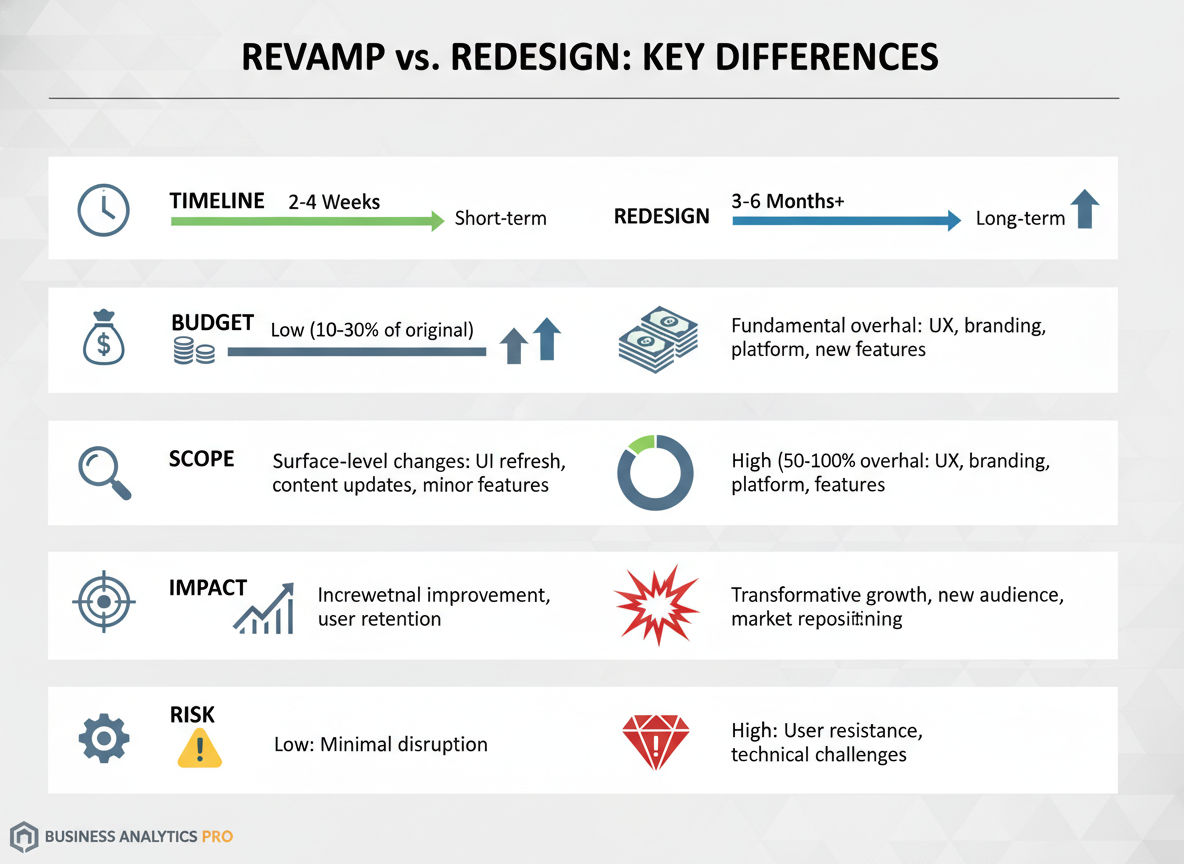
Understanding the website revamp vs redesign distinction requires examining how these approaches differ across multiple dimensions. Each factor affects your decision differently depending on your specific situation and business needs.
The scope and scale represent the most obvious difference. A revamp touches specific elements while leaving the foundation intact. You might update twenty percent of your site while keeping eighty percent the same. A redesign rebuilds one hundred percent of your website, questioning and potentially changing every element. Revamps work within constraints; redesigns eliminate constraints and start fresh.
Quick question
Want to turn this into a real plan?
If you want expert help with strategy, design, development, marketing, or automation — we’ll recommend the fastest path forward for your goals.
This scope difference cascades into every other aspect of the project. When you revamp, you're optimizing existing assets. When you redesign, you're creating new assets. The mindset shifts from "how can we improve this" to "what should this be."
Timeline expectations vary dramatically between these approaches. A typical website revamp takes four to eight weeks, depending on complexity and the number of pages requiring updates. You can often complete revamps in phases, updating sections progressively without taking your entire site offline. A complete redesign typically requires three to six months, sometimes longer for complex sites with extensive functionality or large amounts of content.
Redesigns take longer because every decision requires more consideration. You're not just updating a color scheme—you're establishing an entire design system. You're not just improving a form—you're rethinking how users interact with your business. This thoroughness takes time but produces more transformative results.
Budget considerations show equally stark differences. Website revamps typically cost between five thousand and twenty thousand dollars for small to medium-sized business sites, depending on the extent of changes. You're paying for design updates, some development work, and content refinement. Complete redesigns generally range from fifteen thousand to one hundred thousand dollars or more, reflecting the comprehensive nature of the work. You're paying for strategy, complete design systems, full development, content creation, and migration planning.
The budget gap exists because redesigns involve more specialized expertise and more hours of work. Strategy sessions, user research, complete design mockups, custom development, and extensive testing all add to the investment. However, this investment often delivers better long-term value when fundamental changes are needed.
Impact on existing content and SEO represents a critical difference. Revamps preserve your URL structure and existing content, protecting your search engine rankings. Your pages stay at the same addresses, your backlinks continue working, and your SEO equity remains intact. You might optimize content, but you're not moving or removing it wholesale.
Redesigns require careful SEO planning to avoid losing rankings. URLs often change, requiring 301 redirects to preserve link equity. Content gets rewritten or reorganized, which can temporarily affect rankings until search engines re-index your new site. With proper planning, redesigns can actually improve SEO, but they carry more risk if not executed carefully. Working with professionals who understand technical SEO and digital marketing becomes essential during redesigns.
Technical infrastructure changes differ significantly. Revamps work within your existing platform and hosting environment. You might update plugins or optimize database queries, but the fundamental technology stack remains the same. Redesigns often involve platform migrations, new hosting arrangements, updated security protocols, and completely rebuilt technical foundations.
This technical difference affects long-term maintenance. A revamped site continues using familiar systems and workflows. A redesigned site might require learning new content management tools and updating internal processes for how your team manages the website.
User experience modifications show different depths. Revamps improve specific user experience elements—clearer calls-to-action, better form designs, improved mobile layouts for certain pages. Redesigns reimagine the entire user experience, creating new user flows, navigation patterns, and interaction models. If your users struggle with fundamental aspects of how your site works, revamps provide band-aids while redesigns offer cures.
Signs Your Website Needs a Revamp
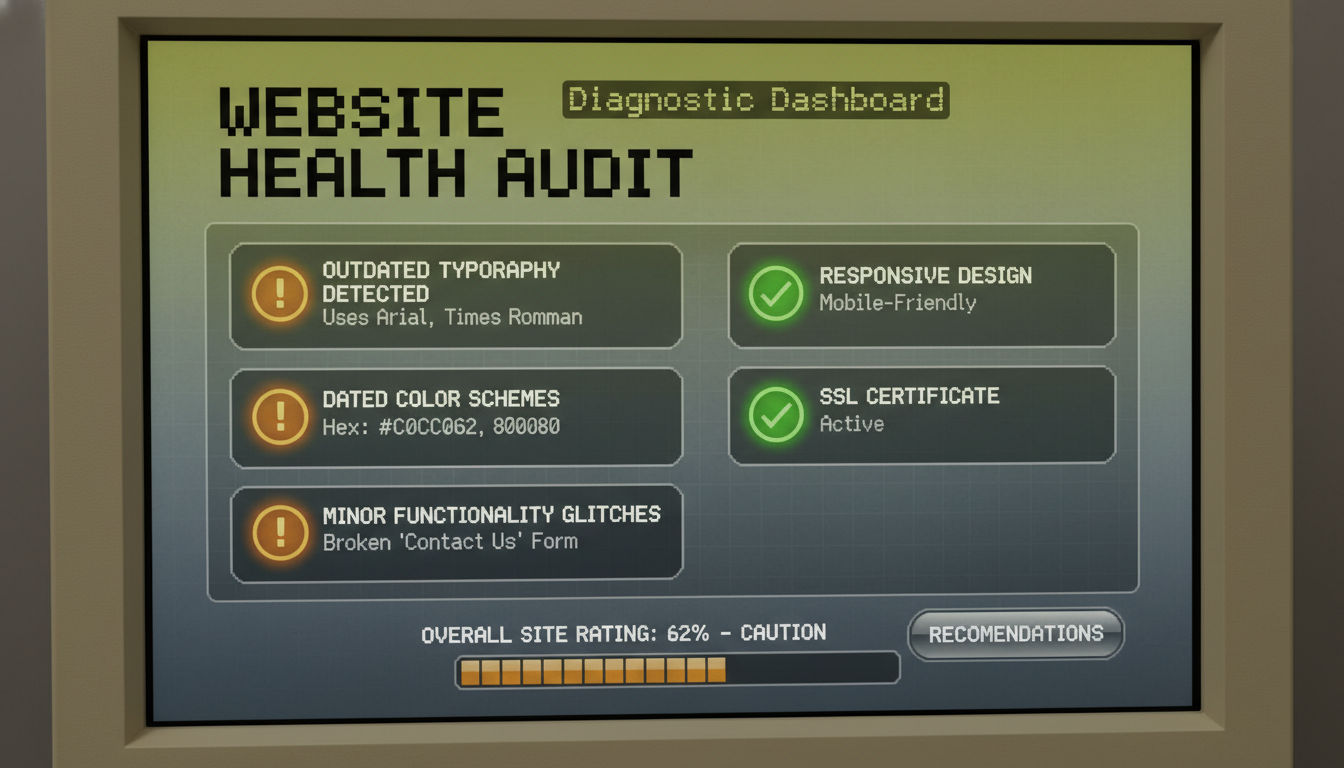
Recognizing when a revamp suffices saves you from over-investing in a complete redesign. Several clear indicators suggest that targeted improvements will effectively address your website's shortcomings without requiring a complete rebuild.
Outdated visual elements represent the most common revamp trigger. If your site uses design trends from five or more years ago—like excessive gradients, outdated fonts, or old-school button styles—but functions well otherwise, visual updates can dramatically improve perception. When clients tell you your site looks dated but still find the information they need, you're looking at a revamp situation. The structure works; the aesthetics need refreshing.
Colors that no longer match your current branding, stock photos that look obviously generic, or typography that feels amateurish all signal that visual updates would significantly improve your site's effectiveness. These elements shape first impressions, and modernizing them often delivers impressive results without touching your underlying infrastructure.
Minor functionality issues indicate revamp territory rather than redesign necessity. Perhaps your contact form works but could be simpler. Maybe your navigation menu functions but could be clearer. If users can accomplish their goals but encounter small frustrations along the way, targeted functionality improvements address these pain points efficiently.
Loading speeds that could be faster, mobile layouts that work but aren't optimal, or interactive elements that function but feel clunky all fall into this category. These issues annoy users without completely preventing them from using your site. Optimization and refinement solve these problems without requiring rebuilding.
Content that needs refreshing suggests a revamp rather than redesign. If your service descriptions are accurate but poorly written, if your about page tells an outdated story, or if your blog hasn't been updated in years, content improvements can transform your site's effectiveness. The pages exist in the right places; they just need better content.
Similarly, if you need to add new sections—like client testimonials, case studies, or updated service offerings—these additions fit within a revamp scope. You're expanding and improving existing pages rather than restructuring how your entire site works.
A good foundation with cosmetic concerns perfectly describes revamp candidates. If your site was built well initially, uses modern technology, works on mobile devices, and has solid SEO fundamentals, cosmetic and moderate functional improvements deliver significant value. Your investment in the original site continues paying dividends; you're simply updating it for current standards.
When your analytics show decent traffic but poor conversion rates on specific pages, revamps targeting those conversion points often solve the problem. If people find your site but don't contact you, improving your calls-to-action, trust signals, and contact forms—all revamp-level changes—can dramatically improve results.
Businesses in Montreal and beyond often discover that their websites need refinement rather than replacement. If your site embarrasses you slightly but doesn't horrify you, if it works but doesn't shine, if it serves your business but could serve it better, you're probably looking at a revamp situation. The key question is whether your foundation supports your business goals—if yes, build on that foundation rather than replacing it.
Signs Your Website Needs a Complete Redesign
Certain problems signal that surface-level improvements won't suffice. When fundamental issues prevent your website from serving your business effectively, a complete redesign becomes the right investment despite the higher cost and longer timeline.
Poor mobile responsiveness represents one of the clearest redesign indicators. If your site doesn't work properly on phones and tablets—requiring pinching, zooming, or horizontal scrolling—you're losing more than half your potential customers. Mobile traffic now exceeds desktop traffic for most businesses, and Google prioritizes mobile-friendly sites in search rankings. If your site wasn't built with responsive design from the start, retrofitting mobile functionality into an old design rarely works well. A redesign built mobile-first solves this problem properly.
When text is unreadable on phones, buttons are too small to tap accurately, or entire sections become unusable on mobile devices, you're not just annoying users—you're actively driving them to competitors. This isn't a cosmetic issue; it's a fundamental structural problem requiring a complete rebuild.
Outdated technology or platform issues necessitate redesigns. If your site runs on an obsolete content management system, uses deprecated code, or relies on technology that's no longer supported or secure, you're running on borrowed time. Security vulnerabilities, incompatibility with modern browsers, and inability to add new features all stem from outdated foundations.
Sites built with Flash, old versions of WordPress or Joomla, or custom-coded systems from ten-plus years ago often reach a point where maintenance becomes more expensive than rebuilding. If adding a simple feature requires extensive custom development, if your hosting company warns about security issues, or if your site breaks with browser updates, your technology has reached end-of-life.
Fundamental structural problems indicate redesign necessity. If your site's navigation confuses users, if important information is buried several clicks deep, if your sitemap doesn't reflect your current business structure, or if users consistently struggle to find what they need, you're dealing with information architecture problems. These issues exist at the foundation level—how your site is organized and how users move through it.
Similarly, if your site loads extremely slowly despite optimization attempts, if it crashes under normal traffic loads, or if your backend is so complicated that updating content becomes a dreaded task, structural problems are preventing success. Band-aid solutions won't fix these issues; you need to rebuild properly.
Major shifts in business direction or branding require redesigns. If your company has merged with another, if you've pivoted to new services or markets, if you've undergone complete rebranding, or if your business model has fundamentally changed, your website needs to reflect that transformation. A site built for your old business won't effectively serve your new direction.
When your visual identity no longer matches your site, when your messaging describes who you were rather than who you are, or when entire service categories need adding or removing, surface updates create inconsistency rather than solving problems. Comprehensive redesigns align your digital presence with your current business reality.
Businesses often reach a tipping point where accumulated small problems create one large problem. If you're making a list of needed changes and it keeps growing, if multiple systems need updating simultaneously, or if you're embarrassed to send prospects to your website, you've likely crossed from revamp into redesign territory.
Professional web development teams can help you assess whether your specific situation requires a complete redesign or if targeted improvements would suffice. If you're unsure, consulting with experts who can audit your current site and recommend the most cost-effective path forward saves you from either under-investing or over-investing in the wrong solution.
Cost Analysis: Revamp vs Redesign

Understanding the financial implications of website revamp vs redesign decisions helps you budget appropriately and set realistic expectations. Both approaches represent investments in your digital presence, but the scale of investment differs significantly.
Average investment ranges for website updates vary by scope and complexity. Website revamps for small to medium-sized business sites typically range from five thousand to twenty thousand dollars. This covers design updates across key pages, content refinement, moderate functionality improvements, and optimization work. Larger sites with more pages or complex functionality might reach thirty thousand dollars, but you're still working within your existing framework.
Complete website redesigns start around fifteen thousand dollars for basic small business sites and commonly range from twenty-five thousand to seventy-five thousand dollars for most small to medium-sized businesses. Complex sites with custom functionality, extensive content, or sophisticated integrations can exceed one hundred thousand dollars. The investment reflects comprehensive strategy, design, development, content creation, and migration work.
These ranges aren't arbitrary—they reflect the actual hours required for quality work. A revamp might need eighty to two hundred hours of professional time. A redesign typically requires two hundred to six hundred hours or more. When you're paying for experienced designers, developers, strategists, and content creators, these hours add up.
Hidden costs deserve consideration in both approaches. Revamps seem straightforward but can uncover technical debt—outdated plugins, poor code quality, or hosting limitations that need addressing. You might discover that "simple" updates require more backend work than anticipated. Budget an additional ten to twenty percent beyond initial estimates for unexpected discoveries.
Redesigns carry their own hidden costs. Content creation often exceeds initial estimates—rewriting every page takes longer than expected. Photography or videography for new designs adds costs. Training your team on new content management systems requires time and sometimes additional support. Post-launch refinements based on real user feedback add to the investment. Plan for fifteen to twenty-five percent additional budget beyond the core redesign cost.
Long-term ROI comparison reveals interesting patterns. Revamps deliver faster returns because they cost less and complete faster. If a ten-thousand-dollar revamp increases your conversion rate by one percent and you generate one hundred leads monthly, you might recoup your investment in months. However, revamps have shorter lifespans—you'll likely need another update in two to four years.
Redesigns require longer to show ROI because of higher initial investment, but they deliver more transformative results. A fifty-thousand-dollar redesign that doubles your conversion rate and positions you competitively for five to seven years often delivers better long-term value. The key is whether your current site's problems are limiting your growth significantly enough to justify the larger investment.
Budget-friendly approaches exist for both options. For revamps, prioritize high-impact pages—your homepage, key service pages, and contact page—before updating everything. Phase the work across quarters if cash flow is tight. For redesigns, consider launching with core functionality first, then adding advanced features in subsequent phases. Starting with a solid foundation and building progressively costs less upfront while still achieving your goals.
Many Montreal businesses and companies elsewhere find that the right approach depends on their growth stage. Startups and newer businesses often benefit from revamps that maximize their initial investment. Established businesses ready to scale typically find redesigns deliver the transformation needed to support growth. Your specific business situation and goals should drive the budget decision more than arbitrary price points.
Timeline Comparison
Understanding realistic timelines for website revamp vs redesign projects helps you plan launches, coordinate marketing efforts, and set appropriate expectations with stakeholders. Both approaches require more time than most business owners initially expect, but for different reasons.
Typical duration for a site refresh ranges from four to eight weeks for most small to medium-sized business sites. This timeline assumes reasonably quick decision-making and content availability. Week one typically involves planning, auditing current content, and defining specific improvements. Weeks two through four focus on design updates and development work. Weeks five through seven involve refinement, testing, and content updates. Week eight handles final quality assurance and launch.
Smaller revamps focusing on specific pages can complete in two to three weeks. More extensive revamps touching dozens of pages and adding significant functionality might extend to ten or twelve weeks. The key advantage of revamps is that they're less disruptive—your site stays live throughout most of the process, with updates happening behind the scenes or on staging servers.
You can also phase revamps over time, updating sections progressively rather than all at once. This approach spreads costs across quarters and allows you to test improvements before rolling them out site-wide. Many businesses update their homepage and key conversion pages first, then tackle secondary pages in subsequent phases.
Expected timeline for complete redesigns typically spans three to six months, sometimes longer for complex projects. Month one focuses on strategy, research, and planning—defining goals, understanding users, auditing content, and establishing project scope. Month two involves information architecture and wireframing—determining site structure and page layouts without visual design.
Next step
Ready for a quote and timeline?
Send a quick note with what you’re building, your deadline, and what success looks like — we’ll reply with clear next steps.
Months three and four center on design and content creation—developing visual concepts, refining designs based on feedback, and writing or rewriting content for the new structure. Month five focuses on development—building the actual site based on approved designs. Month six handles testing, refinement, migration, and launch—ensuring everything works properly before going live.
This timeline assumes relatively efficient decision-making and content availability. Delays in providing feedback, content, or approvals extend timelines significantly. Projects requiring extensive custom functionality, complex integrations, or large amounts of custom content can extend to nine or twelve months.
Factors that affect project length apply to both revamps and redesigns. Decision-making speed significantly impacts timelines. When stakeholders review work and provide feedback within a few days, projects move quickly. When feedback takes weeks, projects stall. Establishing clear approval processes and decision-makers before starting prevents delays.
Content availability affects timelines dramatically. If you have professional photography, written content, and brand assets ready, work proceeds smoothly. If content needs creating from scratch, timelines extend. Many projects spend more time waiting for content than on actual design or development work.
Technical complexity adds time. Simple sites with standard functionality move faster than sites requiring custom features, third-party integrations, or complex database structures. Scope changes during projects—adding features or pages mid-stream—extend timelines and increase costs.
Team availability matters too. If your web development team works exclusively on your project, it completes faster. If they're balancing multiple projects, expect longer timelines. Similarly, your internal team's availability for providing feedback, content, and testing affects overall duration.
Seasonal considerations influence timing. Launching major website changes during your busy season creates internal stress and risks disrupting sales. Planning launches for slower periods allows your team to focus on the transition and address any post-launch issues without competing priorities.
Understanding these timelines helps you plan appropriately. If you need improvements quickly for a specific event or campaign, a targeted revamp might be your only realistic option. If you can plan six months ahead, a comprehensive redesign becomes feasible. Discussing realistic timelines with experienced web development professionals during planning prevents disappointment and ensures successful outcomes.
Making the Right Choice for Your Business
Choosing between a website revamp vs redesign requires honest assessment of your current situation, clear understanding of your goals, and realistic evaluation of your resources. A structured approach to this decision prevents costly mistakes and ensures your investment delivers the results you need.
An assessment framework helps you evaluate your website objectively. Start by examining your current site's technical foundation. Is it built on modern, supported technology? Does it work properly on mobile devices? Is it secure and maintainable? If you answer no to these questions, you're likely looking at a redesign situation.
Next, evaluate your content and structure. Does your site's organization reflect your current business? Is important information easy to find? Does your content accurately represent your services and value proposition? If your structure works but content needs updating, a revamp might suffice.
Then assess visual design and user experience. Does your site look professional and current? Do users struggle with specific tasks, or is the entire experience problematic? Surface-level issues suggest revamps; fundamental usability problems indicate redesigns.
Finally, consider your business context. Has your company changed significantly since your last website update? Are you entering new markets or launching new services? Do you have the budget and timeline for a comprehensive redesign, or do you need faster improvements? Your business reality should drive your decision as much as your website's condition.
Questions to ask before deciding include: What specific problems are we trying to solve? If you can list concrete issues—slow loading, outdated colors, unclear calls-to-action—you're identifying solvable problems. If your answer is "everything," you're probably looking at a redesign.
How much is our current website costing us in lost opportunities? If your site actively prevents conversions or damages your brand, the cost of not fixing it exceeds the cost of a redesign. If it's simply not optimal, a revamp's lower investment might deliver sufficient improvement.
What's our timeline for seeing results? If you need improvements within weeks, revamps are your only option. If you can invest months in a more comprehensive solution, redesigns become feasible.
What resources can we dedicate to this project? Both approaches require your time for feedback, content, and decision-making. Redesigns demand more internal resources over longer periods. Assess honestly whether your team can sustain that involvement.
How long do we expect this solution to serve us? If you're planning another major business change in a year, a revamp might bridge the gap cost-effectively. If you want a solution that lasts five-plus years, investing in a proper redesign makes more sense.
Consulting with web development professionals provides valuable outside perspective. Experienced teams can audit your current site, understand your business goals, and recommend the most cost-effective approach. They've seen hundreds of websites and can identify whether your situation truly requires a complete rebuild or if targeted improvements would achieve your objectives.
Professional consultations also help you understand what's realistic within your budget and timeline. Sometimes the answer isn't purely revamp or redesign but a phased approach—addressing critical issues immediately while planning more comprehensive improvements for later.
When evaluating potential partners, look for teams that ask questions about your business goals rather than immediately pushing the most expensive option. Quality professionals recommend what you need, not what maximizes their revenue. They should be able to show you examples of their previous work and explain their process clearly.
Aligning your choice with business objectives ensures your website investment supports your growth. If your primary goal is generating more leads, focus on conversion optimization—which might be achievable through revamp-level improvements. If your goal is repositioning your brand for a new market, a comprehensive redesign that transforms your entire digital presence makes more sense.
Consider your competitive landscape too. If competitors have significantly better websites, closing that gap might require more than surface-level updates. If you're already competitive and just need to stay current, a revamp maintains your position cost-effectively.
Your decision should feel right for your specific situation. There's no universal answer to the website revamp vs redesign question—the right choice depends on your unique combination of technical condition, business goals, budget, timeline, and growth plans. Taking time to assess these factors thoroughly prevents regret and ensures your investment delivers the results your business needs.
Conclusion
The website revamp vs redesign decision ultimately comes down to whether your site's foundation supports your business goals or prevents them. Revamps work beautifully when you have solid bones that need modernization, delivering significant improvements quickly and cost-effectively. Redesigns become necessary when fundamental problems require complete rebuilding to serve your business properly.
Your specific situation—technical condition, business goals, budget, and timeline—should drive this decision more than any general rule. Take time to assess your website honestly, consult with experienced professionals, and choose the approach that aligns with where your business is headed. Whether you revamp or redesign, the important thing is taking action to ensure your website works as hard for your business as you do.
Ready to determine the best path forward for your website? Contact our team for a comprehensive website assessment and personalized recommendations.