
Introduction
Building a successful digital product is about more than just launching it. It's about ensuring it can grow with your business. Many companies start with a great idea and a working application, only to watch it crumble under the weight of success when user numbers spike or features multiply.
Poor architecture decisions early on can cost businesses thousands in rewrites and lost opportunities. We've seen Montreal-based companies struggle with applications that work perfectly for 100 users but crash with 1,000. The difference? Scalable architecture planning from day one.
This article breaks down the most effective architecture patterns that help applications grow smoothly. Whether you're running a small business planning for growth or managing an enterprise system, understanding these patterns helps you make informed decisions about your technology stack.
We'll explore everything from traditional monolithic systems to modern microservices, database scaling strategies, and caching techniques. Each pattern has its place, and knowing when to use which approach can save your business significant time and money.
The goal isn't to convince you that one pattern is universally better. Instead, we'll help you understand the trade-offs so you can choose what fits your current needs and future goals. Smart architecture decisions balance immediate functionality with long-term flexibility.
Understanding Scalable Architecture Fundamentals
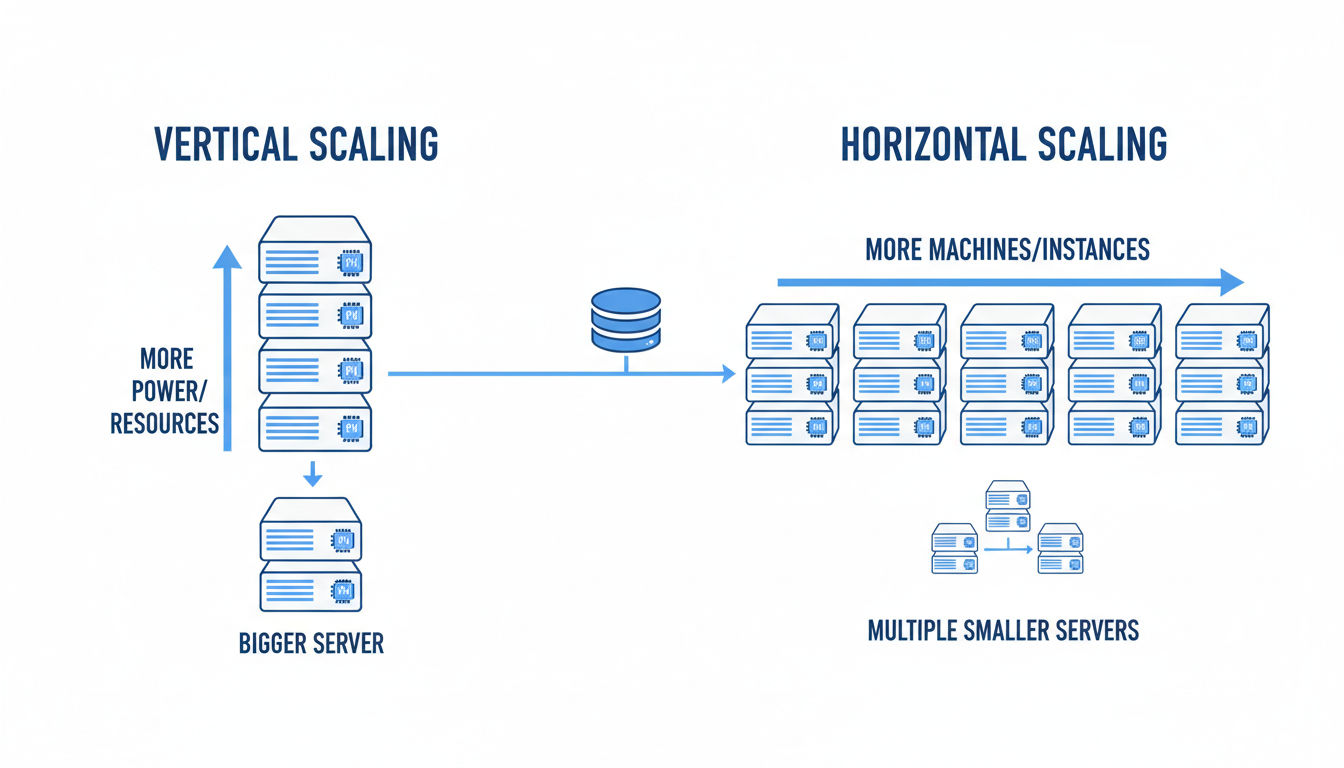
Scalable architecture refers to a system's ability to handle increased workload without sacrificing performance or requiring complete redesigns. Think of it like building a restaurant. A scalable design lets you add more tables, hire more staff, and expand the kitchen without tearing down walls every time you grow.
In modern application development, scalability means your software can accommodate more users, process more data, and deliver more features as your business expands. It's not just about handling growth. It's about doing so efficiently and cost-effectively.
Key Principles That Drive Scalability
Several core principles guide scalable system design. Loose coupling ensures that changes to one part of your system don't break others. This independence makes updates and scaling much simpler.
Statelessness helps systems scale horizontally by ensuring that any server can handle any request. When servers don't need to remember previous interactions, you can add or remove them freely based on demand.
Redundancy protects against failures while enabling load distribution. Having multiple instances of critical components means your application stays online even when individual parts fail. This approach also spreads traffic across resources more effectively.
Modularity breaks complex systems into manageable pieces. Each module handles specific functionality, making it easier to scale only the parts that need it. You don't need to duplicate your entire application when only one feature needs more resources.
Vertical vs. Horizontal Scaling Approaches
Vertical scaling means adding more power to existing servers. You upgrade RAM, add faster processors, or increase storage capacity. It's straightforward and doesn't require application changes. However, it has physical limits and can create single points of failure.
Horizontal scaling adds more servers to distribute the workload. Instead of one powerful machine, you use many smaller ones working together. This approach offers virtually unlimited growth potential and better fault tolerance.
Most modern scalable architecture strategies favor horizontal scaling. Cloud platforms make it easy to spin up new instances automatically based on demand. You pay only for what you use, and you can scale down during quiet periods.
The best systems often combine both approaches strategically. Certain components benefit from vertical scaling while others scale horizontally. Understanding your application's bottlenecks helps you choose the right approach for each component.
When to Prioritize Architecture Scalability
Not every application needs enterprise-level scalability from day one. A local business website serving a few hundred visitors monthly doesn't require the same architecture as a platform expecting millions of users.
Consider scalable architecture when you anticipate significant growth within 12-18 months. If your business model depends on rapid user acquisition or seasonal traffic spikes, planning for scalability upfront saves costly rewrites later.
Signs you need to focus on scalability include frequent performance issues during peak times, difficulty adding new features without system-wide impacts, or increasing infrastructure costs that don't match growth rates. These symptoms suggest your current architecture can't support your trajectory.
Working with experienced development teams helps you assess your actual needs versus over-engineering. At Vohrtech, we help businesses right-size their architecture investments based on realistic growth projections and budget constraints.
Monolithic Architecture Pattern
Monolithic architecture packages all application components into a single, unified codebase. Your user interface, business logic, and data access layers all live together in one deployable unit. It's the traditional approach that powered most applications for decades.
Think of it as a single building where every department operates under one roof. Everything connects directly, communication is straightforward, and you deploy the entire structure as one piece.
Structure and Core Characteristics
A monolithic application typically organizes code into modules or packages, but they all compile and run together. When you update any part of the application, you redeploy the entire system. This tight integration simplifies development in early stages.
The codebase shares common resources like databases, memory, and processing power. All features access the same data structures directly without network calls or complex communication protocols. This direct access makes transactions and data consistency easier to manage.
Development teams can work on a monolithic application using familiar tools and practices. Debugging is straightforward since everything runs in the same process. You can trace execution paths directly without jumping between services or systems.
Advantages for Small to Medium Applications
Monolithic architecture shines when you're starting out or running applications with moderate complexity. Development speed is typically faster since you don't need to manage multiple deployments or service communications.
Testing is simpler because you test one application instead of coordinating tests across multiple services. You can run the entire application locally on a developer's machine, making debugging and iteration quick.
Deployment is straightforward. You build one package and deploy it to your servers. There's no need to orchestrate multiple services or manage complex deployment pipelines. This simplicity reduces operational overhead significantly.
Performance can actually be better for monolithic applications at smaller scales. Direct function calls are faster than network requests between services. You avoid the latency and complexity that distributed systems introduce.
For businesses in Montreal and beyond, monolithic architecture often provides the fastest path to market. You can validate your business model and gather user feedback without investing in complex infrastructure.
Limitations and Scalability Constraints
As applications grow, monolithic architecture shows its limitations. Scaling requires duplicating the entire application, even if only one feature needs more resources. This approach wastes infrastructure spending.
Large codebases become difficult to maintain. Changes in one area can unexpectedly affect others. The tight coupling that simplified early development now creates bottlenecks as teams grow.
Deployment becomes riskier with size. Every change requires redeploying everything, increasing the chance of system-wide failures. Rolling back problems means reverting the entire application.
Technology choices become locked in. You can't easily use different programming languages or frameworks for different features. The entire application must use compatible technologies, limiting your options as requirements evolve.
Best Use Cases
Monolithic architecture works well for applications with predictable, moderate traffic patterns. If you're building an internal business tool, a content management system, or a straightforward e-commerce site, monolithic design often suffices.
Startups validating product-market fit benefit from monolithic simplicity. You can iterate quickly without the overhead of managing distributed systems. Once you've proven your concept and understand your scaling needs, you can evolve the architecture.
Applications with strong consistency requirements also favor monolithic design. When every operation must see the same data immediately, keeping everything in one system simplifies transaction management.
Small to medium-sized businesses with limited technical teams find monolithic applications easier to maintain. You don't need specialized DevOps expertise or complex monitoring systems to keep things running smoothly.
Microservices Architecture Pattern
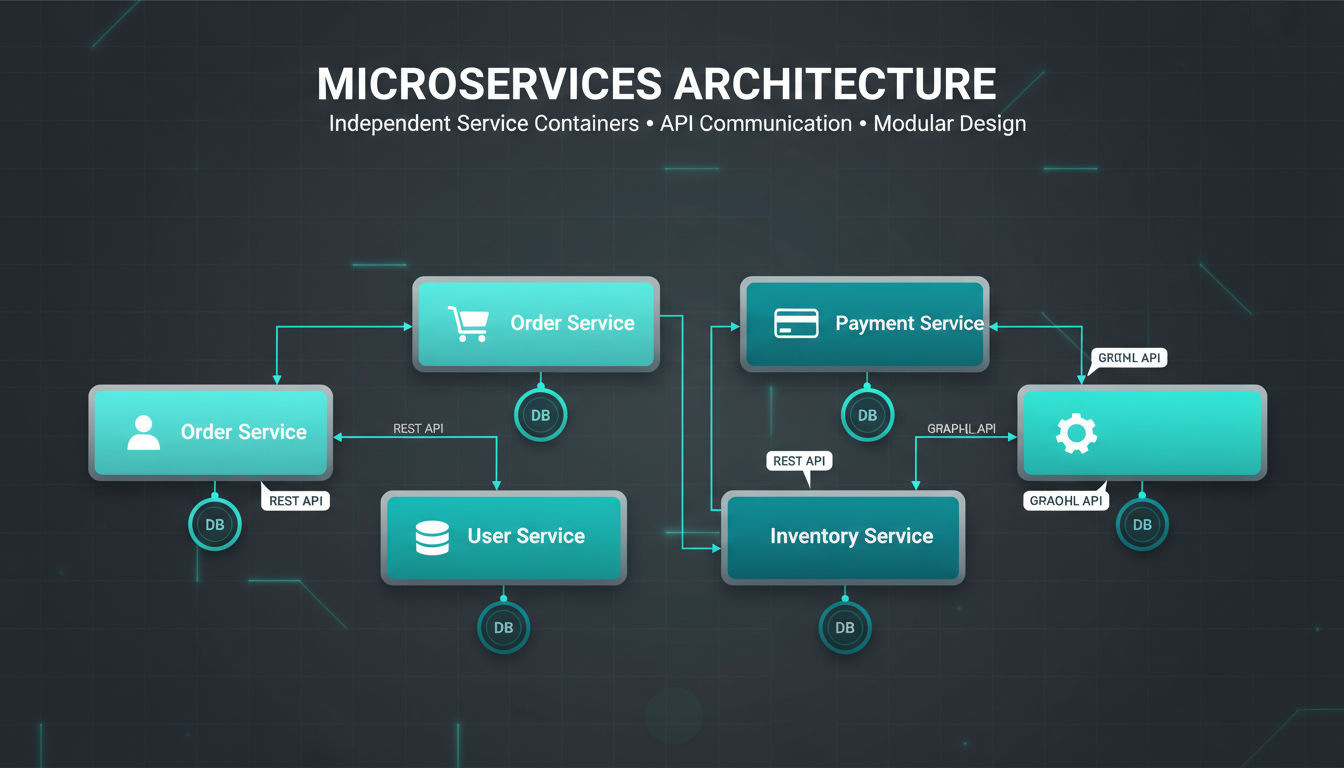
Microservices architecture breaks applications into small, independent services that each handle specific business functions. Instead of one large application, you build many focused services that work together through well-defined interfaces.
Each service owns its data, runs independently, and can be developed, deployed, and scaled separately. This separation creates flexibility that monolithic systems can't match.
Breaking Down Into Independent Services
The key to microservices is identifying clear boundaries between business capabilities. A typical e-commerce application might separate services for user accounts, product catalogs, shopping carts, payments, and order fulfillment.
Each service maintains its own database and business logic. The user service doesn't directly access the order database. Instead, services communicate through APIs or messaging systems. This independence means teams can work on different services simultaneously without coordination overhead.
Services should be small enough that a single team can understand and maintain them completely. If a service grows too complex, it's often split into smaller services. This approach keeps codebases manageable and reduces the risk of changes.
Quick question
Want to turn this into a real plan?
If you want expert help with strategy, design, development, marketing, or automation — we’ll recommend the fastest path forward for your goals.
The independence extends to technology choices. One service might use Python and PostgreSQL while another uses Node.js and MongoDB. Teams choose the best tools for each service's specific requirements rather than compromising on a one-size-fits-all stack.
Benefits for Scalable Architecture
Microservices excel at scaling because you can scale individual services based on their specific demands. If your product search service receives 10 times more traffic than your checkout service, you deploy more search instances without touching checkout.
This targeted scaling reduces infrastructure costs significantly. You're not paying to run multiple copies of features that don't need the capacity. Cloud platforms make this even more efficient with auto-scaling that adjusts resources based on real-time demand.
Fault isolation is another major advantage. When one service fails, others continue operating. Your payment service might experience issues, but users can still browse products and add items to their carts. This resilience keeps your business running even during partial outages.
Development velocity increases as teams work independently. Different services can release updates on different schedules. Your marketing team can launch new features without waiting for the infrastructure team to finish their work.
Technology evolution becomes easier. You can gradually adopt new frameworks or languages by building new services with modern tools while maintaining existing services. This incremental approach reduces risk compared to wholesale rewrites.
Communication Patterns Between Services
Services need reliable ways to communicate. Synchronous communication uses HTTP REST APIs or gRPC. One service makes a request and waits for a response. This pattern works well for operations that need immediate results, like fetching user profile data.
Asynchronous communication uses message queues or event streams. Services publish events to a broker, and other services consume them when ready. This pattern handles high-volume operations better and provides natural buffering during traffic spikes.
Service discovery mechanisms help services find each other in dynamic environments. As instances scale up and down, discovery systems maintain current routing information. This automation is essential for managing dozens or hundreds of service instances.
API gateways provide a single entry point for client applications. They handle authentication, rate limiting, and routing requests to appropriate services. This layer shields clients from the complexity of the underlying microservices architecture.
When to Adopt for Your Business
Microservices make sense when your application has distinct functional areas with different scaling needs. If certain features consistently require more resources than others, independent scaling provides clear benefits.
Organizations with multiple development teams benefit from microservices' independence. Each team can own specific services, reducing coordination overhead and enabling parallel development. This structure works particularly well for companies experiencing rapid growth.
Consider microservices when you need technology flexibility. If different parts of your application have vastly different requirements, the ability to choose specialized tools for each service provides significant advantages.
However, microservices introduce operational complexity. You need robust monitoring, logging, and deployment automation. Small teams or early-stage companies often find this overhead outweighs the benefits until they reach a certain scale.
At Vohrtech, we help businesses assess whether microservices fit their current stage and future plans. Sometimes a well-designed monolith serves you better initially, with a clear migration path to microservices as you grow.
Layered (N-Tier) Architecture Pattern
Layered architecture organizes applications into horizontal layers, each with specific responsibilities. This separation of concerns creates clear boundaries that make applications easier to understand, maintain, and scale.
The most common implementation uses three or four tiers. Each layer only communicates with adjacent layers, creating a structured flow of data and logic through your system.
Separation of Concerns in System Design
The fundamental principle behind layered architecture is that each layer handles one type of responsibility. This specialization makes code more maintainable because changes to one layer rarely affect others.
When you need to change how data is stored, you modify the data layer without touching presentation code. If you redesign your user interface, the business logic remains unchanged. This independence speeds up development and reduces bugs.
Clear layer boundaries also make it easier to enforce security policies. You can ensure that only the data layer directly accesses databases, preventing unauthorized access from higher layers. This structure naturally supports security best practices.
Testing becomes more systematic with layered architecture. You can test each layer independently, mocking the layers above and below. This isolation makes unit testing more effective and integration testing more focused.
Presentation, Business Logic, and Data Layers
The presentation layer handles all user interaction. It displays information and captures user input. This layer contains your web pages, mobile app screens, or API endpoints. It should contain minimal logic, focusing purely on user experience.
The business logic layer processes the actual work your application performs. It enforces business rules, performs calculations, and coordinates workflows. This layer is technology-agnostic, meaning it doesn't care whether requests come from a web browser or mobile app.
The data layer manages all data persistence and retrieval. It handles database connections, executes queries, and maps database records to application objects. This layer shields the rest of your application from database-specific details.
Many applications add a fourth service layer between presentation and business logic. This layer provides a clean API for external consumers and handles cross-cutting concerns like authentication, logging, and caching.
Scalability Advantages and Trade-offs
Layered architecture supports both vertical and horizontal scaling strategies. You can scale specific layers independently based on their resource needs. The presentation layer might need more instances to handle user traffic while the data layer remains stable.
Caching strategies work naturally with layered architecture. You can cache at the presentation layer to reduce server requests, at the business layer to avoid repeated calculations, or at the data layer to minimize database queries.
Load balancing fits cleanly into layered designs. You can distribute requests across multiple presentation layer instances while they all connect to the same business logic layer. This separation makes scaling more predictable.
However, layered architecture can introduce performance overhead. Each layer adds some latency as requests pass through. For applications requiring extremely low latency, this overhead might be problematic.
The rigid structure can sometimes feel constraining. When features naturally span multiple layers, you might find yourself passing data through layers that add little value. Finding the right balance between structure and pragmatism requires experience.
Implementation Considerations
Start by clearly defining what belongs in each layer. Document these boundaries and enforce them through code reviews and architectural guidelines. Consistency matters more than perfection in the exact placement of every component.
Use dependency injection to manage connections between layers. This approach makes layers more testable and flexible. You can swap implementations without changing the layers that depend on them.
Consider using separate projects or modules for each layer in your codebase. This physical separation reinforces logical boundaries and makes it harder for developers to accidentally create inappropriate dependencies.
Monitor performance across layers to identify bottlenecks. If the data layer becomes a constraint, you can optimize queries or add caching without rewriting your business logic or presentation code.
For businesses evaluating their architecture options, layered design offers a middle ground between monolithic simplicity and microservices complexity. It provides structure and scalability while remaining manageable for smaller teams.
Event-Driven Architecture Pattern
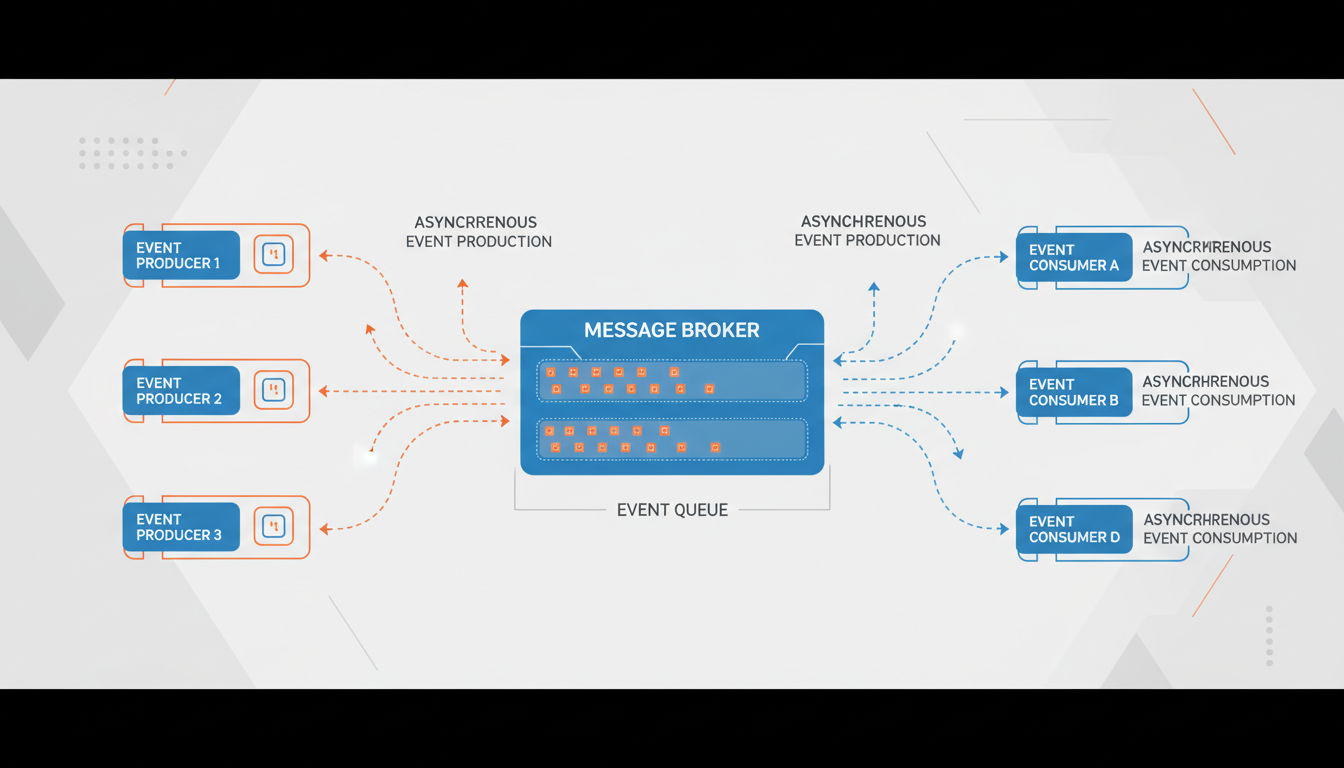
Event-driven architecture organizes systems around the production, detection, and reaction to events. Instead of components directly calling each other, they communicate by publishing and subscribing to events that represent meaningful state changes.
An event might be "user registered," "order placed," or "payment processed." Components interested in these events react independently without knowing who generated the event.
Asynchronous Communication for Scalable Architecture
Event-driven systems excel at handling operations that don't need immediate responses. When a user places an order, you can immediately confirm receipt while processing payment, updating inventory, and sending notifications asynchronously in the background.
This asynchronous approach prevents bottlenecks. If your email service is slow, it doesn't delay order confirmation. Each component processes events at its own pace, and temporary slowdowns in one area don't cascade through the entire system.
Decoupling is the major advantage here. Event producers don't know or care who consumes their events. You can add new features by subscribing to existing events without modifying the systems that generate them. This flexibility accelerates development significantly.
Buffering happens naturally in event-driven systems. When traffic spikes, events queue up and get processed as resources become available. This built-in resilience helps systems handle unpredictable load patterns without crashing.
Event Producers, Consumers, and Brokers
Event producers generate events when significant actions occur. These might be user actions, system processes, or external integrations. Producers publish events to a broker without knowing who will consume them.
Event brokers act as intermediaries that receive, store, and route events. Popular brokers include Apache Kafka, RabbitMQ, and cloud services like AWS SNS/SQS. They ensure events aren't lost and can be replayed if needed.
Event consumers subscribe to specific event types they care about. Multiple consumers can react to the same event differently. When an order is placed, one consumer might send a confirmation email, another updates inventory, and a third triggers fulfillment.
This many-to-many relationship creates powerful flexibility. Adding new functionality often means just adding a new consumer. You don't modify existing code, reducing the risk of breaking working features.
Event schemas define the structure of events. Well-designed schemas include all information consumers need to react appropriately. They should be versioned to handle evolution as your system grows.
Real-Time Processing Capabilities
Event-driven architecture enables true real-time processing. Systems can react to events within milliseconds of them occurring. This capability powers features like live dashboards, instant notifications, and real-time analytics.
Stream processing frameworks like Apache Flink or Kafka Streams let you analyze events as they flow through your system. You can detect patterns, calculate aggregates, and trigger actions based on event sequences in real-time.
This real-time capability creates competitive advantages. E-commerce sites can adjust pricing based on demand instantly. Monitoring systems can alert teams to problems before users notice. Customer service tools can provide agents with up-to-the-second information.
Complex event processing identifies meaningful patterns from multiple simple events. You might trigger a fraud alert not from any single transaction, but from a pattern of transactions occurring in unusual sequence or timing.
Business Applications and Benefits
Event-driven architecture fits naturally with modern business processes. Many real-world workflows are inherently event-based. A customer's journey through your business generates events at each touchpoint, from initial visit through purchase to support interactions.
Audit trails and compliance become simpler with event-driven systems. Every significant action generates an immutable event record. You can reconstruct system state at any point in time by replaying events, which is invaluable for debugging and regulatory compliance.
Integration with external systems becomes cleaner. Instead of tight coupling with partner APIs, you generate events that integration services consume. If a partner's API changes, you update only the integration service, not your core business logic.
Scalability improves dramatically because event consumers can scale independently. If email sending becomes a bottleneck, you add more email consumer instances without touching order processing or inventory management.
For Montreal businesses and beyond, event-driven architecture particularly benefits applications with complex workflows, multiple integrations, or requirements for real-time responsiveness. The pattern does require more sophisticated infrastructure and monitoring, but the flexibility and scalability often justify the investment as companies grow.
Database Scaling Patterns
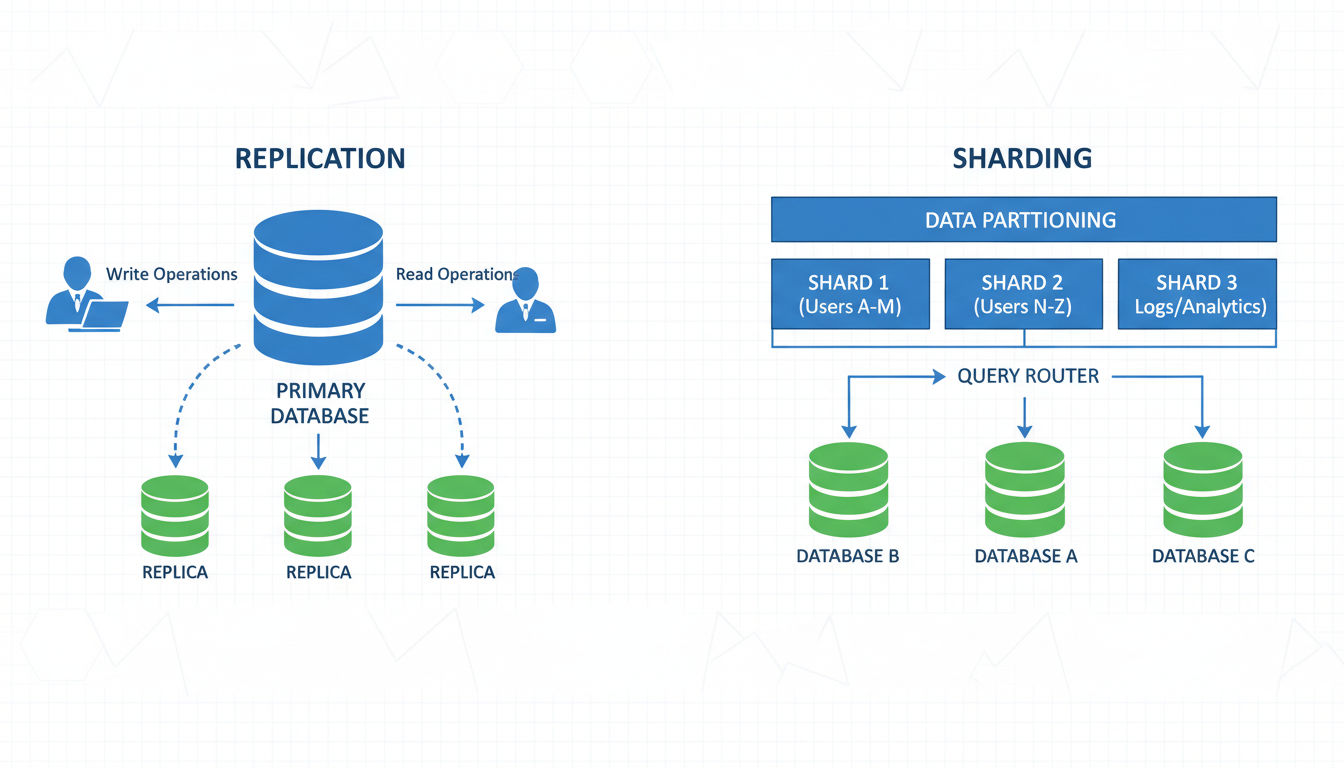
Database performance often becomes the first major bottleneck as applications scale. While application servers can scale horizontally easily, databases require more sophisticated strategies to handle increasing data volumes and query loads.
The right database scaling approach depends on your data characteristics, consistency requirements, and query patterns. Most successful systems combine multiple strategies.
Database Replication Strategies
Replication creates multiple copies of your database across different servers. The primary copy handles writes while replicas handle read queries. This distribution dramatically increases read capacity, which is often the first scaling need.
Master-slave replication uses one primary database that accepts all writes. Changes replicate to multiple read-only slaves that handle query traffic. This setup works well when your application performs far more reads than writes, which describes most business applications.
Multi-master replication allows writes to multiple database instances simultaneously. This approach provides better write scalability and geographic distribution but introduces complexity around conflict resolution. When two masters receive conflicting updates, your system needs clear rules for resolution.
Replication lag is a key consideration. Changes to the primary database take time to propagate to replicas. Applications must handle scenarios where they read slightly outdated data. For many use cases, this eventual consistency is acceptable.
Geographic replication places database replicas in different regions. Users connect to the nearest replica, reducing latency significantly. This strategy improves both performance and disaster recovery capabilities.
Sharding and Partitioning in Application Architecture
Sharding splits your database horizontally, distributing rows across multiple database instances. Each shard contains a subset of your total data. This approach scales both reads and writes since different shards handle different portions of your workload.
The sharding key determines how data gets distributed. Common strategies include sharding by user ID, geographic region, or date ranges. Choosing the right key is critical because it affects both performance and complexity.
Effective sharding keys distribute data evenly across shards and align with your query patterns. If most queries filter by customer ID, sharding by customer makes sense. Queries for a single customer hit one shard, avoiding expensive cross-shard operations.
Cross-shard queries become challenging with sharding. Operations that need data from multiple shards require application-level coordination. This complexity is why sharding is typically a last resort after exhausting other options.
Vertical partitioning splits tables by columns rather than rows. Frequently accessed columns go in one partition while rarely used columns go in another. This strategy reduces I/O for common queries and can improve cache efficiency.
CQRS (Command Query Responsibility Segregation)
CQRS separates read and write operations into different models. Write operations go to a command model optimized for data integrity and consistency. Read operations use query models optimized for specific access patterns.
This separation allows you to scale reads and writes independently. You might have one write database with strong consistency guarantees and multiple read databases with denormalized data optimized for different query patterns.
The write model maintains normalized data with strict business rules. When data changes, events update one or more read models asynchronously. Each read model structures data perfectly for its specific queries.
CQRS particularly benefits applications with complex domains where read and write patterns differ significantly. Reporting and analytics often need different data structures than transactional operations. CQRS lets you optimize both without compromise.
The pattern does introduce complexity. You maintain multiple data models and handle eventual consistency between them. For simpler applications, traditional approaches often suffice. CQRS shines when query complexity or scale demands specialized optimization.
Choosing the Right Approach
Start with the simplest approach that meets your needs. Most applications should begin with replication, adding read replicas as query load increases. This strategy is well-understood, widely supported, and relatively simple to implement.
Consider sharding only when you've exhausted vertical scaling and replication options. Sharding introduces significant complexity in both application code and operations. Make sure the benefits justify the costs.
Evaluate your consistency requirements carefully. If your application can tolerate eventual consistency, you gain more scaling options. Strong consistency requirements limit your choices and typically reduce maximum scale.
Monitor your database performance metrics continuously. Query latency, connection pool utilization, and replication lag tell you when you're approaching limits. Proactive scaling prevents performance emergencies.
Working with experienced teams helps you avoid common pitfalls. At Vohrtech, we've helped businesses implement database scaling strategies appropriate to their growth stage, avoiding both under-engineering and premature optimization.
Caching Strategies for Scalability
Caching stores frequently accessed data in fast-access locations, dramatically reducing load on backend systems. Effective caching can improve response times by orders of magnitude while reducing infrastructure costs.
The key is caching at the right layers with appropriate invalidation strategies. Poor caching creates stale data problems while good caching appears invisible to users.
Content Delivery Networks (CDNs)
CDNs cache static assets like images, CSS, JavaScript, and videos at edge locations worldwide. When users request these files, they're served from nearby CDN servers rather than your origin servers.
This geographic distribution reduces latency significantly. A user in Montreal loads your site from a Canadian edge location while a user in Tokyo loads from an Asian edge location. Both get fast performance without you managing servers globally.
CDNs also reduce bandwidth costs and origin server load. Your servers only need to serve content to the CDN, not to every end user. This reduction can be substantial for media-heavy applications.
Modern CDNs offer more than static file caching. They can cache API responses, handle SSL termination, provide DDoS protection, and even run code at the edge. These capabilities make CDNs essential infrastructure for scalable web applications.
Configuration matters significantly. Set appropriate cache headers to control what gets cached and for how long. Static assets can often be cached for days or weeks, while dynamic content might cache for seconds or minutes.
Application-Level Caching
Application caching stores computed results, rendered pages, or frequently accessed data in memory. This approach avoids expensive recalculations and database queries for repeated requests.
In-memory caches like Redis or Memcached provide microsecond access times. They're perfect for session data, user preferences, and computed values that don't change frequently.
Next step
Ready for a quote and timeline?
Send a quick note with what you’re building, your deadline, and what success looks like — we’ll reply with clear next steps.
Page caching stores entire rendered pages. When the same page is requested again, you serve the cached version instead of regenerating it. This strategy works well for content that's identical for all users or changes infrequently.
Fragment caching stores portions of pages. You might cache a complex sidebar or product recommendations while generating other parts dynamically. This granular approach balances freshness with performance.
Cache invalidation is the hardest part. You need strategies to remove or update cached data when underlying information changes. Time-based expiration works for some use cases, but event-based invalidation provides better consistency.
Database Query Caching
Query caching stores database results so repeated queries return cached data instead of hitting the database. This approach reduces database load and improves response times for common queries.
Database-level query caches are built into many database systems. They automatically cache query results and invalidate them when underlying tables change. This automatic management simplifies implementation but offers less control.
Application-level query caching gives you more control over what gets cached and for how long. You can cache complex aggregations or reports that are expensive to generate but don't need real-time accuracy.
Object caching stores entire objects or entities rather than raw query results. After loading a user profile from the database, you cache the entire user object. Subsequent requests for that user skip the database entirely.
Prepared statement caching improves performance by reusing query execution plans. While not caching results, this approach reduces the overhead of parsing and planning queries repeatedly.
Impact on Performance and Software Architecture
Effective caching can reduce backend load by 80-90% for read-heavy applications. This reduction means you can serve more users with the same infrastructure or significantly reduce hosting costs.
Response times improve dramatically when data comes from cache instead of databases or external APIs. Users experience faster page loads and more responsive applications, improving satisfaction and conversion rates.
Caching provides natural protection against traffic spikes. When a piece of content goes viral, cached responses handle the surge without overwhelming your backend systems. This resilience prevents outages during your biggest opportunities.
However, caching introduces complexity around data consistency. You need clear strategies for when cached data is acceptable and when you need real-time accuracy. Most applications use a hybrid approach, caching aggressively where possible while keeping critical paths fresh.
Cache warming strategies pre-populate caches before they're needed. This proactive approach prevents cache stampedes where many requests simultaneously discover empty caches and overwhelm backend systems trying to populate them.
Load Balancing and Distribution Patterns
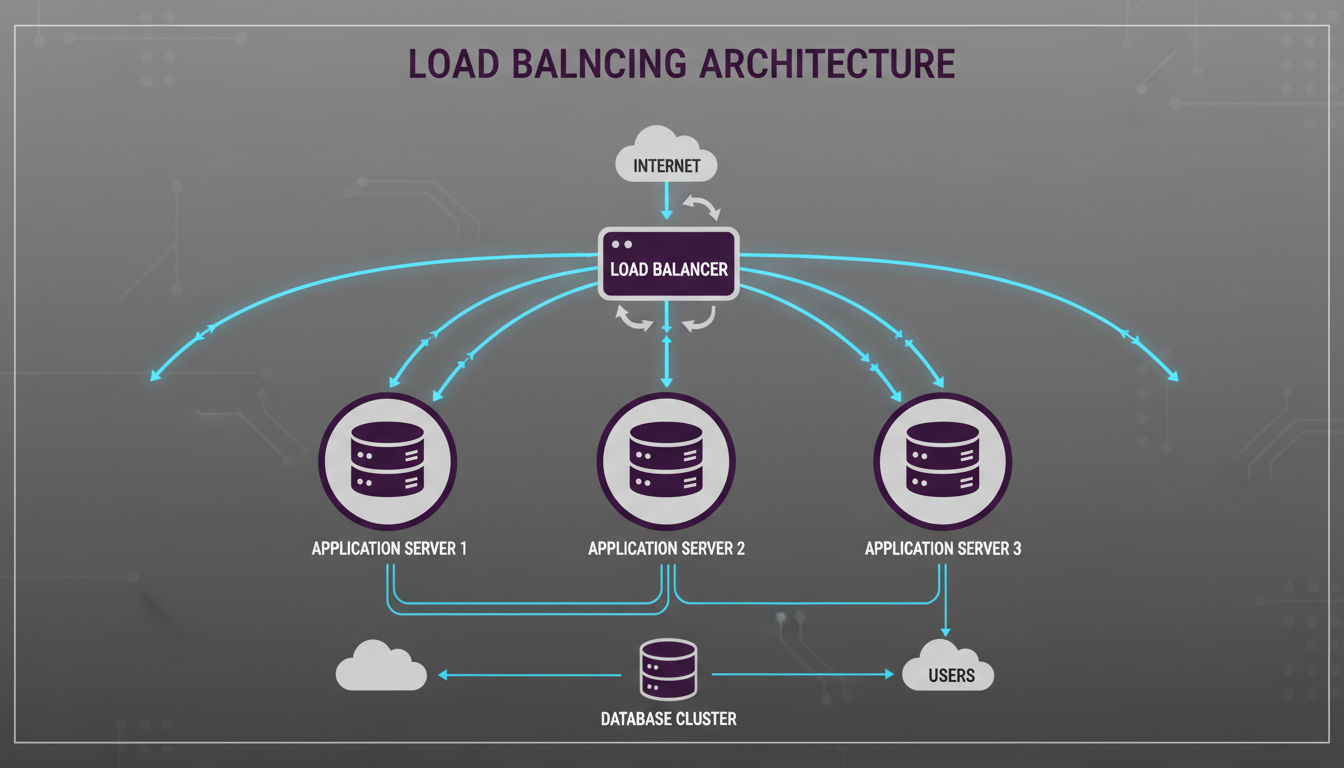
Load balancing distributes incoming traffic across multiple servers, ensuring no single server becomes overwhelmed. This distribution improves both performance and reliability by spreading workload and providing redundancy.
Modern applications use load balancing at multiple layers, from DNS to application servers to database connections.
Distributing Traffic Across Multiple Servers
Load balancers sit between clients and your application servers, routing each request to an available server. This intermediary role makes scaling transparent to users. You can add or remove servers without clients noticing.
Hardware load balancers are physical devices optimized for high-throughput traffic distribution. They offer excellent performance but come with significant costs and limited flexibility.
Software load balancers like Nginx, HAProxy, or cloud-native solutions provide more flexibility at lower costs. They run on standard servers and can be configured and scaled programmatically.
Layer 4 load balancing operates at the transport layer, distributing traffic based on IP addresses and TCP/UDP ports. It's fast and efficient but can't make decisions based on application-level information.
Layer 7 load balancing operates at the application layer, examining HTTP headers and content. This deeper inspection enables sophisticated routing based on URLs, cookies, or custom headers.
Load Balancing Algorithms
Round-robin distributes requests sequentially across servers. Each server gets requests in turn, providing simple and even distribution. This algorithm works well when all servers have similar capacity and all requests have similar resource requirements.
Least connections routes requests to servers with the fewest active connections. This approach handles varying request durations better than round-robin. Servers that complete requests quickly naturally receive more new requests.
Weighted distribution assigns different proportions of traffic to different servers. You might send 70% of traffic to powerful servers and 30% to smaller ones. This flexibility helps you utilize heterogeneous infrastructure efficiently.
IP hash routes requests from the same client IP to the same server. This consistency helps with session management and caching. Users get consistent experiences, and server-side caches become more effective.
Health checks ensure load balancers only route traffic to healthy servers. Balancers periodically test each server's responsiveness. Failed servers are automatically removed from rotation until they recover.
Session Management in Scalable Architecture
Stateless applications are easiest to scale because any server can handle any request. Users don't have session data tied to specific servers, so load balancers can route freely based on current capacity.
Sticky sessions route all requests from a user to the same server for the duration of their session. This approach simplifies session management but reduces load balancing flexibility and creates problems when servers fail.
Session replication copies session data across all servers. Any server can handle any request because all servers have all session data. This approach provides good resilience but becomes inefficient as server counts grow.
Centralized session storage keeps session data in a shared cache or database. All application servers read and write to this central store. This approach scales well and handles server failures gracefully.
Token-based authentication eliminates server-side session storage entirely. Clients include authentication tokens with each request. Servers validate tokens without maintaining session state. This stateless approach scales effortlessly.
Infrastructure Considerations
Cloud load balancers integrate seamlessly with auto-scaling groups. As your application scales up or down, load balancers automatically adjust to route traffic to current instances. This automation is essential for elastic scaling.
SSL termination at the load balancer offloads encryption work from application servers. The load balancer handles the expensive SSL handshake and decrypts traffic before routing it to backend servers. This optimization improves application server capacity.
Geographic load balancing routes users to the nearest data center. Users in North America connect to your Montreal servers while European users connect to European servers. This distribution reduces latency and provides disaster recovery capabilities.
DDoS protection often integrates with load balancing infrastructure. Load balancers can detect and filter malicious traffic before it reaches your application servers. This protection is increasingly essential for internet-facing applications.
Monitoring and observability are critical for load-balanced systems. You need visibility into traffic distribution, server health, and response times. Good monitoring helps you identify bottlenecks and optimize your configuration.
For businesses implementing scalable architecture, load balancing is rarely optional. Even modest applications benefit from the reliability and flexibility it provides. The complexity is manageable, especially with cloud platforms that offer load balancing as a managed service.
Conclusion
Choosing the right architecture patterns for your application requires balancing current needs with future growth. There's no universal solution that works for every business at every stage.
Start by honestly assessing your scale requirements. A startup validating product-market fit has different needs than an established business experiencing rapid growth. Over-engineering wastes resources while under-engineering creates painful rewrites later.
Most successful scalable architecture strategies begin simple and evolve progressively. Launch with a well-designed monolith, add caching and load balancing as traffic grows, then consider microservices or event-driven patterns when complexity and scale demand them.
The patterns covered in this article work together rather than competing. Real-world systems often combine layered architecture with event-driven communication, microservices with monolithic databases, and caching at multiple levels. Understanding each pattern's strengths helps you compose the right solution.
Pay attention to your bottlenecks. Monitor performance continuously to understand where your system struggles. Scale those specific areas rather than prematurely optimizing everything. This targeted approach maximizes return on your architecture investments.
Taking the Next Step
Professional development teams bring experience implementing these patterns across diverse projects. They've seen what works, what fails, and how to adapt patterns to specific business contexts.
At Vohrtech, we help Montreal businesses and beyond design and implement scalable architecture appropriate to their stage and goals. Whether you're starting fresh or evolving existing systems, we focus on delivering value without unnecessary complexity.
The right architecture supports your business growth rather than constraining it. It provides room to evolve as you learn more about your users and market. Most importantly, it delivers reliable performance that keeps users happy and your business running smoothly.
If you're evaluating your application's architecture or planning a new project, we'd love to discuss your specific needs. Contact us to explore how we can help you build systems that grow with your success.